The real power of a smart home is not the ability to turn lights on from your phone. It is the quiet way routines handle everyday tasks without constant input. When lights, temperature, locks, and appliances respond to time, motion, or your arrival, the house starts working with you instead of waiting for instructions.
Good automation feels almost invisible. It removes small decisions, reduces energy waste, and makes the home more comfortable for everyone who lives there. The best systems start simple and grow only as needed.
Understanding How Automation Works
Most smart home platforms rely on a few building blocks:
- Triggers start an action (time of day, motion detected, door unlocked, temperature threshold).
- Conditions refine when the action should happen (only if someone is home, only after sunset, only on weekdays).
- Actions are the results (lights on, thermostat adjusted, blinds closed, notification sent).
- Scenes group several actions into one command or routine.
Scheduled automation runs at set times. Responsive automation reacts to sensors or presence. Most useful homes combine both.
Morning and Bedtime Routines
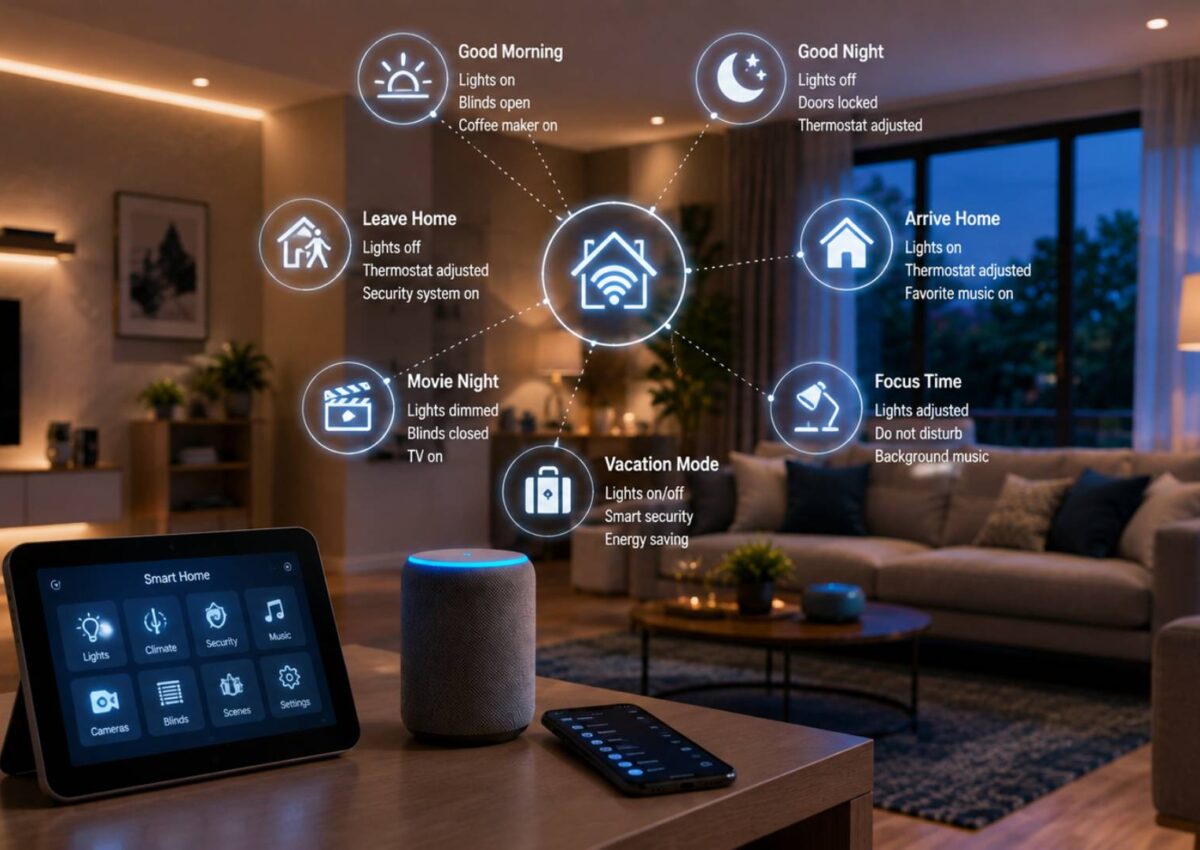
A reliable morning routine can ease the start of the day. Fifteen minutes before the alarm, the bedroom lights can rise slowly, the thermostat can shift to a comfortable temperature, and the coffee maker (on a smart plug) can begin brewing. Curtains or blinds can open to let in natural light.
At bedtime the reverse happens. Lights throughout the house dim or turn off in sequence, the thermostat adjusts for sleep, doors lock, and selected devices power down. A single “Good Night” command or a set time can handle the entire sequence. These routines work especially well when they run the same way every day so household members know what to expect.
Arrival and Departure Settings
Presence detection turns a house into a responsive space. When the last person leaves, the system can set the thermostat back, turn off lights, close blinds, and arm security sensors. When the first person arrives, lights can welcome them, the temperature can return to comfort mode, and selected doors can unlock if desired.
Geofencing (using phone location) or motion and door sensors make these transitions automatic. The goal is a home that prepares itself without requiring anyone to open an app.
Lighting That Adapts
Lighting automation delivers some of the highest daily value. Motion sensors can turn on hallway or bathroom lights at night at a low level so no one fumbles for switches. Living-room lights can brighten for evening activity and then soften later. Outdoor lights can activate at dusk and switch off at dawn or when motion stops.
Avoid programming every light to react to every movement. Focus on high-traffic or low-visibility areas where automatic control removes friction.
Temperature and Comfort Adjustments
Smart thermostats shine when paired with schedules and presence. Set comfortable temperatures for morning, daytime, evening, and sleep. Let the system ease back when the house is empty and recover before people return. In homes with multiple zones or mini-splits, each area can follow its own pattern.
Sensors that detect open windows can pause cooling or heating to avoid waste. These small responsive rules often save more energy than aggressive setbacks alone.
Security and Peace of Mind
Automation can handle routine security checks. At a set evening time or when the house goes into “away” mode, the system can confirm doors and windows are closed, turn on selected lights to simulate presence, and arm cameras or sensors. A notification can arrive if something remains open.
Keep these routines simple and reliable. Overly complex security sequences that fail or send constant false alerts quickly become ignored.
Blinds, Shades, and Selected Appliances
Motorized blinds can open with the morning routine, close for privacy or heat control during the day, and adjust again in the evening. Smart plugs turn ordinary lamps, fans, or small appliances into controllable devices. A plug on a space heater, dehumidifier, or charging station can follow schedules or respond to temperature and humidity sensors.
Start with the appliances you already use daily. Automating rarely used devices adds little value.
Scheduled vs. Responsive Automation
Scheduled routines create predictable structure—lights at sunset, temperature changes at fixed hours, bedtime sequences. Responsive routines add flexibility: lights that activate only when motion is detected, temperature adjustments only when someone is home, or fans that run when humidity rises.
Most households benefit from a mix. Relying only on schedules can feel rigid. Relying only on sensors can create unexpected behavior if sensors are poorly placed or too sensitive.
Common Mistakes to Avoid
- Automating tasks that are already easy and fast by hand.
- Creating overlapping or conflicting routines that fight each other.
- Building systems so complex that other family members cannot adjust or override them.
- Ignoring reliability—choose stable hubs and devices rather than chasing every new gadget.
- Forgetting to test routines under real conditions (guests present, power outage recovery, different times of day).
Keep the primary user experience straightforward. Anyone in the house should be able to turn lights on manually or stop a routine without hunting through an app.
Starting Small and Scaling Up
Inexpensive smart plugs and a few bulbs can automate lamps, coffee makers, and seasonal fans. Adding motion sensors and a smart thermostat expands the possibilities significantly. Full professional integration makes sense for new construction or major renovations, but most people gain the majority of benefits from a modest, well-planned setup.
Focus first on the moments that create daily friction—dark hallways at night, an empty house left with lights on, or a too-warm bedroom in the morning. Solve those, then expand.
Frequently Asked Questions
What is the difference between a scene and a routine?
A scene usually groups several devices into one command you trigger manually or by voice. A routine runs automatically based on time, sensors, or presence. Many platforms let you combine both.
Do I need a central hub for automation?
Not always. Some devices work through their own apps or cloud services. A hub or local controller often improves reliability, speed, and the ability to create more complex conditions, especially if internet service drops.
How do I avoid routines that annoy other people in the house?
Keep overrides simple—physical switches or easy voice commands should always work. Involve household members when designing routines and give them a clear way to pause or adjust automation.
Can automation really save energy?
Yes, when it reduces unnecessary runtime. Turning lights off in empty rooms, setting the thermostat back when the house is vacant, and closing blinds against afternoon sun all cut waste without sacrificing comfort.
What should I automate first?
Start with lighting in hallways or entryways, a basic thermostat schedule, and a simple away/home presence routine. These deliver noticeable daily benefits with relatively little complexity.
Conclusion
Effective smart home automation removes small, repeated decisions so the house supports daily life instead of adding to it. Morning and bedtime sequences, arrival and departure settings, adaptive lighting, thoughtful temperature control, and simple security checks deliver the greatest practical value. Start with clear routines that serve everyone in the household, mix schedules with responsive triggers, and resist the urge to automate everything at once. When the system works quietly in the background, the technology disappears and the comfort remains.